Vistas
En src/main/webapp creamos el archivo index.xhtml y escribimos lo siguiente:
 <html xmlns="http://www.w3.org/1999/xhtml"
    xmlns:h="http://java.sun.com/jsf/html"
    xmlns:f="http://java.sun.com/jsf/core"
    xmlns:p="http://primefaces.org/ui">

    <h:head>
    <title>GenBarCode</title>
    </h:head>

    <h:body>

    <style type="text/css">
    body .ui-panelgrid .ui-panelgrid-cell:last-child {
        background-color: #ffffff;
    }
</style>

  <h:form>

 <p:fieldset legend="GenBarCode" style="margin-bottom:20px">
        <h:panelGrid columns="1" cellpadding="5">

            <h:outputText
                value="Seleciona el formato de código de barras que quieras generar." />
                    <p:linkButton value="Ver ejemplos" outcome="ejemplos"   target="_blank"    style="margin-right:20px;">

</p:linkButton>
        </h:panelGrid>
    </p:fieldset>


  <p:growl id="msgs" showDetail="true" />

        <p:dashboard id="board" model="#{barCodeBean.model}">
            <p:ajax event="reorder" listener="#{barCodeBean.handleReorder}" update="msgs" />
             <p:panel id="formatos" header="Seleccionar Formato" >
             <p:panelGrid columns="2">
<p:outputLabel for="codebar" value="Seleccionar Formato" />

        <p:selectOneMenu id="codebar" value="#{barCodeBean.codebar}" style="width:135px">
            <f:selectItem itemLabel="Interleaved 2 of 5" itemValue="int2of5" />
            <f:selectItem itemLabel="Codabar" itemValue="codabar" />
            <f:selectItem itemLabel="Code39" itemValue="code39" />
            <f:selectItem itemLabel="Code128" itemValue="code128" />
            <f:selectItem itemLabel="EAN-8" itemValue="ean8" />
            <f:selectItem itemLabel="EAN-13" itemValue="ean13" />
            <f:selectItem itemLabel="UPC-A (PNG)" itemValue="upca" />
           <f:selectItem itemLabel="PDF417" itemValue="pdf417" />
           <f:selectItem itemLabel="DataMatrix" itemValue="datamatrix" />
           <f:selectItem itemLabel="Postnet" itemValue="postnet" />
           <f:selectItem itemLabel="QR" itemValue="qr" />

            .

        </p:selectOneMenu>
<p:outputLabel for="code" value="Agregar código" />
<p:inputText id="code" value="#{barCodeBean.code}" >
       </p:inputText>


<p:commandButton value="Generar formato" update="display" oncomplete="PF('dlg').show()" icon="pi pi-check" />
</p:panelGrid>
</p:panel>
 <p:panel id="upca" header="UPC-A (PNG)" >
             <p:panelGrid columns="2">
<p:outputLabel for="codeUpca" value="Escribir código" />


<p:inputText id="codeUpca" value="#{barCodeBean.codeUpca}" >
       </p:inputText>


<p:commandButton value="Generar formato" update="display2" oncomplete="PF('dlg2').show()" icon="pi pi-check" />
</p:panelGrid>
</p:panel>
<p:panel id="upce" header="UPC-E (Vertical)" >
             <p:panelGrid columns="2">
<p:outputLabel for="codeUpce" value="Escribir código" />


<p:inputText id="codeUpce" value="#{barCodeBean.codeUpce}" >
       </p:inputText>


<p:commandButton value="Generar formato" update="display3" oncomplete="PF('dlg3').show()" icon="pi pi-check" />
</p:panelGrid>
</p:panel>
 </p:dashboard>
<p:dialog header="Código de Barras" modal="true" showEffect="bounce" widgetVar="dlg" resizable="false">
        <p:panelGrid columns="2" id="display" columnClasses="label,value">
            <p:graphicImage>
                <p:barcode id="imagen" value="#{barCodeBean.code}" type="#{barCodeBean.codebar}"
                 />
            </p:graphicImage>

            <p:commandButton value="Imprimir Código" type="button" icon="pi pi-print" style="display:block;margin-bottom: 20px">
    <p:printer target="imagen" />
</p:commandButton>
        </p:panelGrid>
    </p:dialog>
    <p:dialog header="Código de Barras" modal="true" showEffect="bounce" widgetVar="dlg2" resizable="false">
        <p:panelGrid columns="2" id="display2" columnClasses="label,value">
            <p:graphicImage>
                <p:barcode id="imagen2" value="#{barCodeBean.codeUpca}" type="upca"
             format="png"    />
            </p:graphicImage>

            <p:commandButton value="Imprimir Código" type="button" icon="pi pi-print" style="display:block;margin-bottom: 20px">
    <p:printer target="imagen2" />
</p:commandButton>
        </p:panelGrid>
    </p:dialog>
     <p:dialog header="Código de Barras" modal="true" showEffect="bounce" widgetVar="dlg3" resizable="false">
        <p:panelGrid columns="2" id="display3" columnClasses="label,value">
            <p:graphicImage>
                <p:barcode id="imagen3" value="#{barCodeBean.codeUpce}" type="upce"
             orientation="90"   />
            </p:graphicImage>

            <p:commandButton value="Imprimir Código" type="button" icon="pi pi-print" style="display:block;margin-bottom: 20px">
    <p:printer target="imagen3" />
</p:commandButton>
        </p:panelGrid>
    </p:dialog>


    </h:form>

     </h:body>
</html>
  <html xmlns="http://www.w3.org/1999/xhtml"
    xmlns:h="http://java.sun.com/jsf/html"
    xmlns:f="http://java.sun.com/jsf/core"
    xmlns:p="http://primefaces.org/ui">

    <h:head>
    <title>GenBarCode</title>
    </h:head>

    <h:body>

    <style type="text/css">
    body .ui-panelgrid .ui-panelgrid-cell:last-child {
        background-color: #ffffff;
    }
</style>

  <h:form>

 <p:fieldset legend="GenBarCode" style="margin-bottom:20px">
        <h:panelGrid columns="1" cellpadding="5">

            <h:outputText
                value="Ejemplos que soporta primefaces." />
        </h:panelGrid>
    </p:fieldset>

<style type="text/css">
    body .ui-panelgrid .ui-panelgrid-cell:last-child {
        background-color: #ffffff;
    }
</style>


<p:panelGrid columns="2">
    <h:outputText value="Interleaved 2 of 5" />
    <p:barcode value="0123456789" type="int2of5" />

    <h:outputText value="Codabar" />
    <p:barcode value="0123456789" type="codabar"/>

    <h:outputText value="Code39" />
    <p:barcode value="0123456789" type="code39" />

    <h:outputText value="Code128" />
    <p:barcode value="0123456789" type="code128"/>

    <h:outputText value="EAN-8" />
    <p:barcode value="20123451" type="ean8"/>

    <h:outputText value="EAN-13" />
    <p:barcode value="0123456789012" type="ean13"/>

    <h:outputText value="UPC-A (PNG)" />
    <p:barcode value="01234567895" type="upca" format="png"/>

    <h:outputText value="UPC-E (Vertical)" />
    <p:barcode value="01234133" type="upce" orientation="90"/>

    <h:outputText value="PDF417" />
    <p:barcode value="0123456789" type="pdf417"/>

    <h:outputText value="DataMatrix" />
    <p:barcode value="0123456789" type="datamatrix"/>

    <h:outputText value="Postnet" />
    <p:barcode value="0123456789" type="postnet"/>

    <h:outputText value="QR" />
    <p:barcode value="0123456789" type="qr"/>
</p:panelGrid>


    </h:form>

     </h:body>
</html>
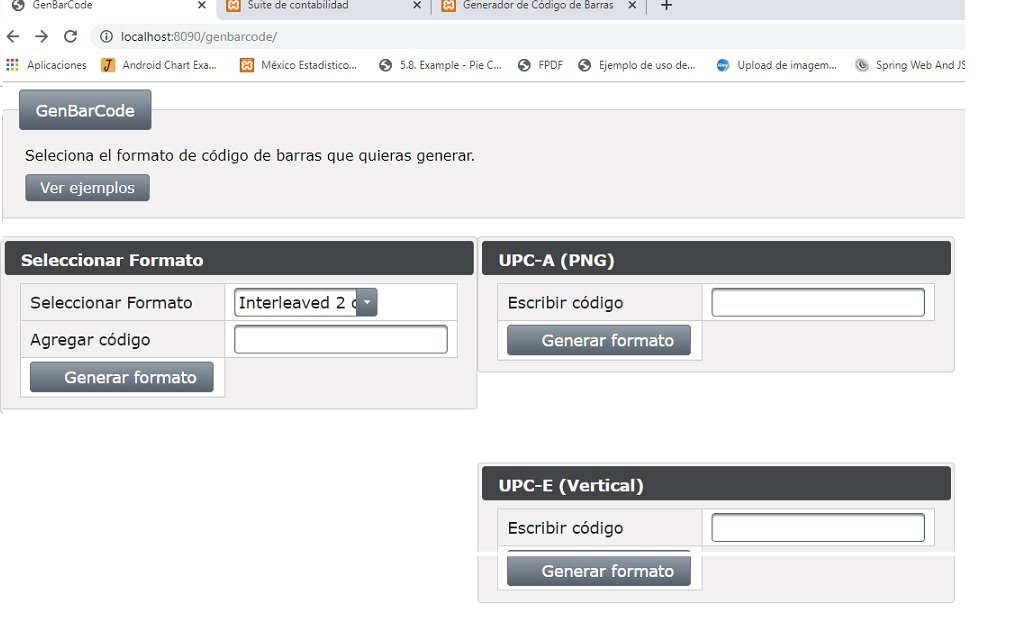
Corremos la aplicación
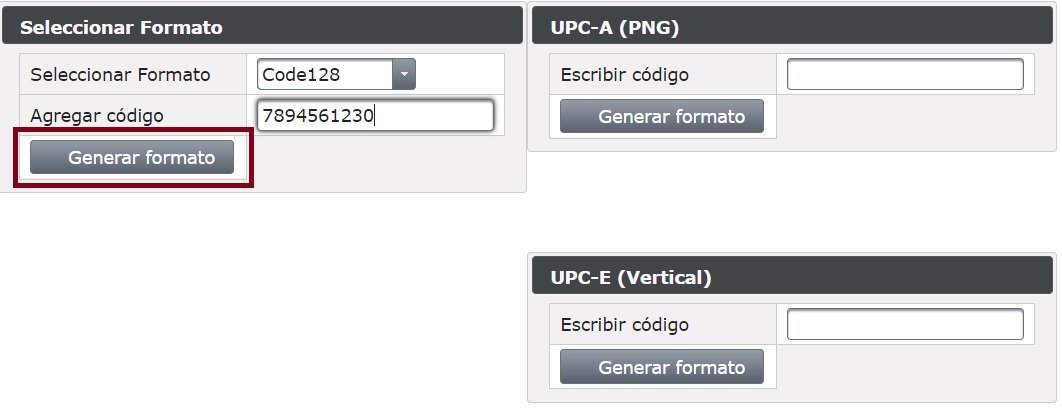
Nos vamos al dashboard que dice seleccionar formato y selecionamos un formato Code128 y escribmos 7894561230 luego presionamos Generar Formato
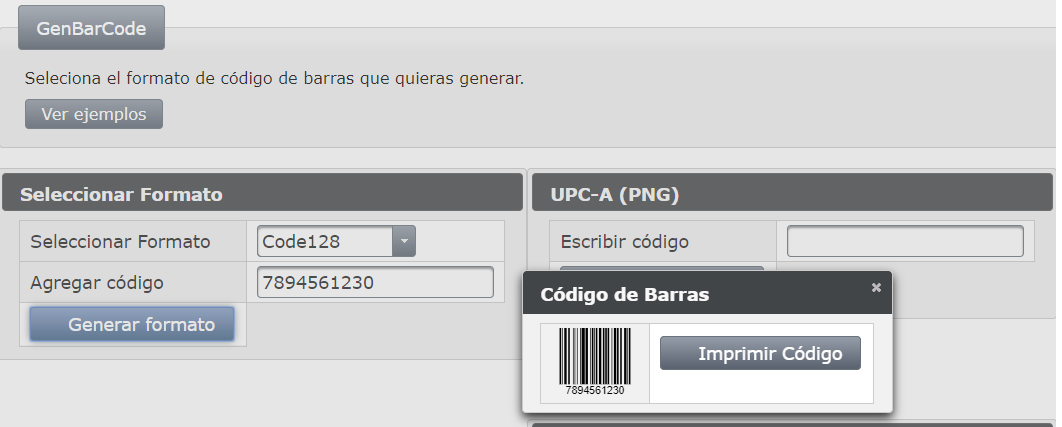
Esto es lo que nos genera:
Seleccionamos Imprimir Código
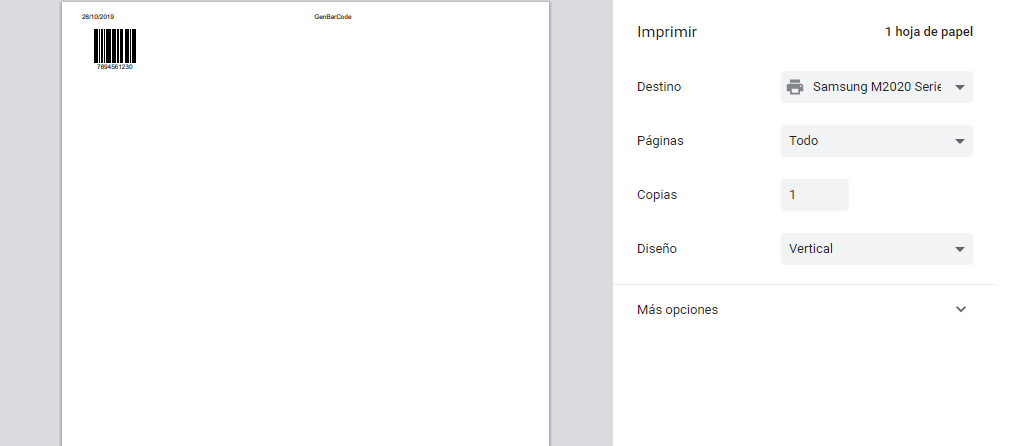
El resultado es el siguiente:
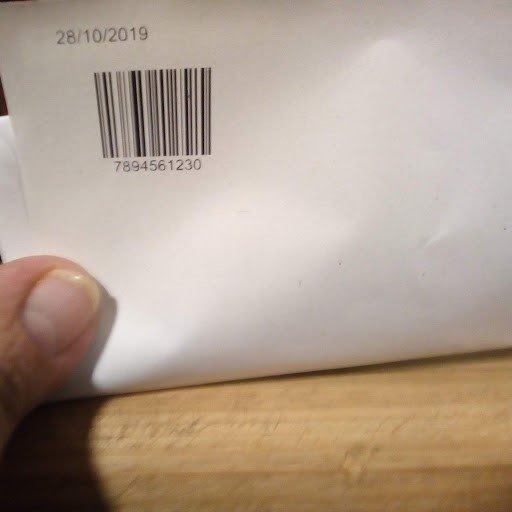
Si tienes scanner puedes probar.
Ahora generamos un codigo UPC-A (PNG) con 71864400094
y presionamos Generar Formato

El resultado que arroja es este:
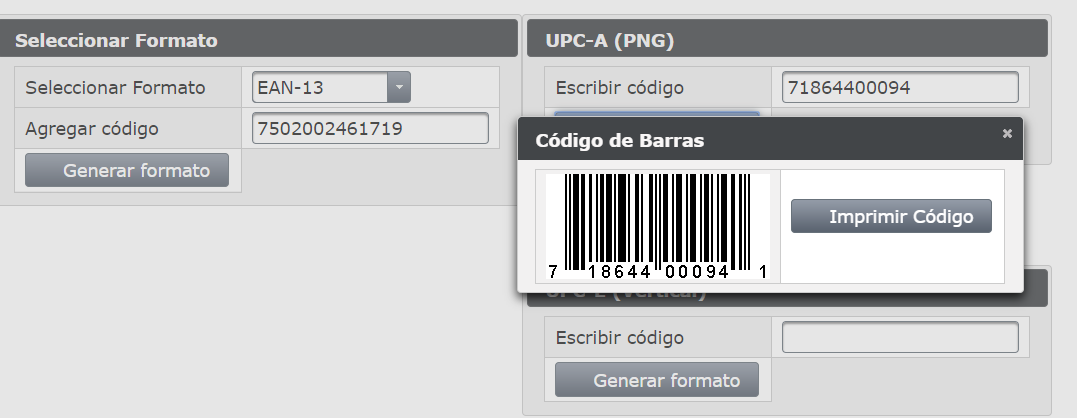
Puedes ir probando los demás formatos.